How to Export Receipts to a CSV Your Accountant Can Use
Dated, categorized, totaled, in one file. What accountants want, and how to produce it. It's a file export, not a live sync.

To export receipts to CSV in a form your accountant can actually use, aim for one row per receipt: date, merchant, category, subtotal, tax, tip, total, currency, payment method and a short note on the business purpose. Pick the period they asked for (a quarter or the whole year), export it, and send a summary of totals by category alongside it. That pair heads off most follow-up questions, and nobody retypes a thing.
What accountants want from a freelancer
A folder of phone photos named IMG_4471 is evidence, but it isn’t a record anyone can sort, total or import.
What helps is boring in the best way:
- Dated. Every row has a purchase date, so expenses land in the right quarter and year.
- Categorized. A first-pass category on each row, even if they move a few. Our guide to Schedule C expense categories explains the headings most freelancers sort into.
- Totaled. A summary they can check against your bank and card statements.
- In one file. One CSV for the period, not twelve monthly attachments spread across three email threads.
The IRS says supporting documents for business expenses should identify the payee, the amount paid, proof of payment, the date, and a description showing the expense was for business (see What kind of records should I keep). A good receipt CSV mirrors those elements, which is why the notes column matters more than it looks. Still working from a pile? Start with our weekly receipt system.

The columns that matter, with a sample receipt CSV
Whatever tool produces it, a receipts-to-spreadsheet export should carry these columns. This is the exact set InvoScan writes, in this order:
| Column | What it holds | Why your accountant cares |
|---|---|---|
date | Purchase date, YYYY-MM-DD | Puts the expense in the right period |
merchant | Who you paid | The payee, for matching to statements |
category | Your expense category | A starting point for their own mapping |
subtotal | Pre-tax amount | Separates the purchase from sales tax |
tax | Sales tax or VAT charged | Some clients track it separately |
tip | Gratuity, if any | Explains why the total differs from the subtotal |
total | What you actually paid | The number that hits your card statement |
currency | ISO code, e.g. USD | Stops a CAD taxi being read as US dollars |
payment_method | How you paid, e.g. card and last four digits | Which account to reconcile against |
notes | Business purpose | The “why” behind the expense |
Here’s what five rows look like. Every name and number below is fictional, and the card numbers are masked:
date,merchant,category,subtotal,tax,tip,total,currency,payment_method,notes
2026-07-30,Lakeshore Taxi,Travel,31,4.03,5,40.03,CAD,Visa ••4242,"Airport to venue, Toronto workshop"
2026-07-21,CloudDraw Studio,Software & Subscriptions,19.99,,,19.99,USD,Visa ••4242,Monthly design app plan
2026-07-15,Pixelmart Supplies,Office Supplies,36.99,3.29,,40.28,USD,Visa ••4242,Printer ink for client proofs
2026-07-09,Juniper Cafe,Meals,42.5,3.72,8,54.22,USD,Mastercard ••1881,"Lunch with client, Q3 brand kickoff"
2026-07-02,Harbor Desk Coworking,Rent & Lease,350,,,350,USD,Visa ••4242,July hot desk
A few details worth copying, whichever app you use:
- Amounts are plain numbers. No dollar signs or thousands separators, so spreadsheets can add them up. Format them as currency after opening.
- Blank means blank. An empty
tipcell is clearer than a zero. - Commas get quoted. A note containing a comma is wrapped in quotes so it stays in one cell.
- Currency is per row. Mixed currencies are fine when the column says which is which.
Why a category-summary PDF helps
The CSV is for working. The PDF is for reading. A short summary of totals by category lets your accountant spot the odd thing (why is Travel four times last quarter?) before they open a spreadsheet, and gives you both a shared reference for a call: “the Meals line on page one.”
How to export receipts to CSV in InvoScan, step by step
InvoScan is our own receipt scanner for freelancers, and it’s launching soon. You snap or import a receipt, AI on our server reads the fields (the photo goes to Anthropic’s API, or to OpenAI’s as a backup; neither trains on API data), and the app opens each new scan in an edit form so you can check and correct the merchant, date, category and amounts. Exports use the figures stored when you export, so review your scans first. Here’s the hand-over:
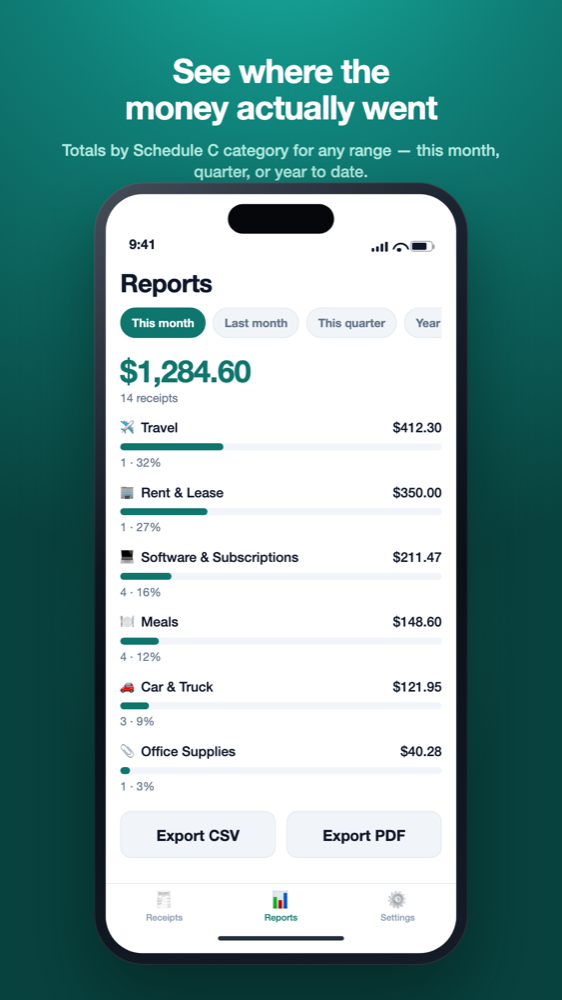
- Open the Reports tab. Pick This month, Last month, This quarter or Year to date, or tap Custom and set a From and To date. Ranges use the purchase date; a receipt without one falls back to the day you captured it.
- Check the totals. You’ll see the period total, the receipt count, and each category with its count, share and a bar. If something looks off, fix the receipt before you export.
- Tap Export CSV. Your phone’s share sheet opens with a file named like
invoscan-2026-07-01_to_2026-09-30.csv. Email it, save it to Files or send it wherever your accountant collects things. - Tap Export PDF. You get a summary per currency (count, total and share for each category), then a list of every receipt with date, merchant, category and total.
Honest limits: the export is a file, not a sync with QuickBooks, Xero or any other tool. The CSV holds one row per receipt, so line items aren’t in it, and neither export carries the receipt photos; those stay in your private account. Currencies are totaled separately, never converted, so readers outside the US can use it too, under their own tax rules. Exporting is included on the free plan, which covers 10 AI scans a month (see pricing).
Opening it in Excel, Google Sheets or bookkeeping software
Excel
Double-clicking is fine for plain English text. If accented letters or symbols come out garbled (a café, or the dots in a masked card number), import the file instead of opening it. Microsoft’s documented route is Data → Get Data → From File → From Text/CSV (Opening CSV UTF-8 files correctly in Excel).
Google Sheets
Use File → Import, upload the CSV, choose whether to create a new spreadsheet or replace the current sheet, and leave the separator on “Detect automatically” or set it to comma (Google’s import help).
Bookkeeping software: column mapping
Import screens rarely match your headers exactly, so you (or your accountant) map columns. QuickBooks Online’s transaction upload, for example, expects either three columns (Date, Description, Amount) or four (Date, Description, Credit, Debit), asks for every date in one consistent format, and has you match columns before importing (Intuit’s upload guide). A receipt CSV usually maps like this:
| Receipt CSV column | Typical import field | Watch out for |
|---|---|---|
date | Date | The tool may want a different date format |
merchant (+ notes) | Description or payee | Merge the two in a spreadsheet if you want both |
total | Amount | How the tool expects spending to be signed |
category | Account or category | Often reassigned by your accountant after import |
currency | Usually no field | Split non-USD rows out first |
Ask before you reformat
Many accountants would rather receive the raw CSV and do the mapping themselves. A quick “what format do you want?” saves both of you an afternoon.
Backups with “Export all data”
A quarterly export covers your accountant. A full export covers you. In InvoScan, Settings → Export all data (CSV) writes every saved receipt to one file,invoscan-all-data.csv, with the same columns as above. Save a copy somewhere you control a few times a year, or before you delete your account.
Keep the originals as well. The IRS says to keep records for as long as they may matter for a tax return, generally three years and longer in some situations (How long should I keep records). How long that is for you is a question for your tax professional.

Before you hit send
- The date range matches what your accountant asked for.
- Every new scan has been opened, checked and saved.
- No receipts are left uncategorized, and the odd ones have a note.
- Totals roughly match your card and bank statements for the period.
- Non-USD receipts are flagged, or split into their own file.
- You’re sending both files: the CSV and the category summary PDF.
If that sounds like the hand-over you want, join the waitlist and we’ll tell you when InvoScan is in the stores.
Frequently asked questions
How do I export receipts to CSV for my accountant?
Keep one row per receipt with the date, merchant, category, amounts, currency, payment method and a business-purpose note. Filter to the period your accountant wants, export the CSV, and send a category-summary PDF with it.
What columns should a receipt spreadsheet have?
At minimum: date, merchant, category, total and a business-purpose note. Subtotal, tax, tip, currency and payment method make checking against statements easier. See the IRS page What kind of records should I keep.
Can I import a receipt CSV into QuickBooks?
Usually, with column mapping. QuickBooks Online's upload expects three columns (Date, Description, Amount) or four (Date, Description, Credit, Debit); see Intuit's guide. InvoScan exports a file; it doesn't sync with QuickBooks.
Does a CSV export replace my original receipts?
No. The CSV summarizes your receipts; the receipts themselves are the supporting documents. The IRS covers retention on How long should I keep records. Ask a tax professional about your situation.
Does the InvoScan export include line items or receipt photos?
No. The CSV has one row per receipt with the ten columns above, and photos stay in your private account. For the category column, see our Schedule C categories guide.
Not tax advice
This article is general education for US self-employed filers, based on IRS guidance as of September 2026. It is not tax, accounting or legal advice. InvoScan's category suggestions are starting points, not tax advice, and AI-read figures should always be checked. For decisions about your own return, talk to a qualified tax professional such as a CPA or enrolled agent. See our Terms.