Schedule C Expense Categories Explained, With Receipt Examples
The expense lines self-employed filers see, the kind of receipt that usually lands on each, and the gray areas where a tax pro should decide.

Schedule C expense categories are the lines in Part II of Schedule C (Form 1040), where self-employed people total their business costs: advertising on line 8, car and truck on line 9, office expense on line 18, meals on line 24b, utilities on line 25, a catch-all “Other expenses” on line 27b, and home office on line 30. Below is every line in plain English with a typical receipt, then the gray areas (meals, vehicles, home office, software) where a tax professional should decide.
Line names and numbers here come from the 2025 Schedule C and its IRS instructions, the versions used for returns filed in 2026. The IRS can relabel or renumber lines between years, so check the current form before you file.
What Schedule C Part II expenses are
Schedule C reports profit or loss from a business you run as a sole proprietor, which is how many freelancers and gig workers file. Part I is income, Part II is expenses. Lines 8 through 27b hold business costs, line 28 totals them, line 29 is tentative profit, line 30 takes off business use of your home, and line 31 is net profit.
Two rules shape everything below: the expense must be ordinary and necessary for your business, and the Part II heading says “Enter expenses for business use of your home only on line 30.” If you sell physical products, the cost of your stock goes in Part III (cost of goods sold) instead. That’s why line 22 reads “Supplies (not included in Part III).”
The Schedule C expense categories list, line by line
The receipts are fictional examples of what typically lands on each line. Whether a given cost is deductible for you depends on your facts.
| Line | Name on the form | Typical freelancer receipt |
|---|---|---|
| 8 | Advertising | Boosted social post, printed flyers, a sponsored newsletter slot |
| 9 | Car and truck expenses | Parking and tolls; gas and repairs if you use actual costs (see below) |
| 10 | Commissions and fees | A referral commission you paid to whoever sent you a client |
| 11 | Contract labor | Invoice from a freelance editor or developer you hired |
| 12 | Depletion | Rare for freelancers (natural resources such as timber) |
| 13 | Depreciation and section 179 expense deduction | Laptop, camera or desk that lasts beyond a year (via Form 4562) |
| 14 | Employee benefit programs | Only if you have employees |
| 15 | Insurance (other than health) | Professional liability or equipment insurance premium |
| 16a / 16b | Interest: mortgage / other | Interest on a business loan or business credit card |
| 17 | Legal and professional services | Your accountant’s invoice, a lawyer reviewing a client contract |
| 18 | Office expense | Printer paper, toner, stamps |
| 19 | Pension and profit-sharing plans | Employee plans only; your own contributions go on Schedule 1 |
| 20a | Rent or lease: vehicles, machinery, and equipment | Camera or lighting rental for a shoot |
| 20b | Rent or lease: other business property | Monthly studio or office rent (not your home) |
| 21 | Repairs and maintenance | Laptop screen repair, lens cleaning |
| 22 | Supplies (not included in Part III) | Materials used up on client work: props, craft stock, printing |
| 23 | Taxes and licenses | City business license renewal (not federal income or self-employment tax) |
| 24a | Travel | Flight and hotel for an out-of-town client workshop |
| 24b | Deductible meals | Lunch with a client (usually 50% deductible) |
| 25 | Utilities | The business share of a second phone line, power for a rented studio |
| 26 | Wages (less employment credits) | Payroll for employees, not what you pay yourself |
| 27a | Energy efficient commercial bldgs deduction | Rare for freelancers (Form 7205) |
| 27b | Other expenses (from line 48) | Tax-prep software, anything without a line of its own |
| 30 | Expenses for business use of your home | Your home office, via Form 8829 or the simplified method |
Gray areas to take to a tax pro
These are the receipts to flag for whoever prepares your return.
Meals (line 24b)
The receipt shows the full amount, but the deduction usually doesn’t. The instructions say that “in most cases, the percentage is 50%,” and entertainment doesn’t go on this line at all. They also set conditions. The meal can’t be lavish, you have to be there, and it has to be with a client, customer or similar business contact. A solo coffee at your laptop doesn’t obviously meet those conditions, and meals on overnight trips follow their own rules in IRS Publication 463. The receipt won’t say who was there or why, so write it down while you remember.

Vehicles: your car, a rental, a ride you paid for
For your own car, line 9 offers two methods. The standard mileage rate multiplies business miles by the IRS rate, plus parking and tolls: 70 cents a mile for 2025, and for 2026, 72.5 cents from January to June and 76 cents from July to December, per the IRS standard mileage rates page. The actual-expense method uses the business share of gas, repairs, insurance and depreciation instead. On the standard rate you don’t also deduct actual operating costs, so gas receipts may never reach the return, while parking and tolls count either way. Either way you need a log of business miles, which receipts don’t show.
Vehicle rental or lease payments go on line 20a (unless you use the standard mileage rate for a leased car), and leases of 30 days or more may need an adjustment. A rideshare you took as a passenger isn’t your vehicle. On an overnight business trip it sits with travel on line 24a, while same-day trips fall under local transportation in chapter 4 of Pub 463 (commuting isn’t deductible). Ask your preparer where a local fare belongs.

Home office (line 30)
Home-office costs never go on the Part II lines. They’re figured on Form 8829 or with the simplified method: $5 per square foot, up to 300 square feet. Either way, the space must be used regularly and exclusively for business. So your home electric bill doesn’t belong under Utilities. Keep home receipts separate and let your preparer choose the method.
Software and equipment (lines 13 and 27b)
There’s no software line. The 2025 instructions list “technology and software tools,” including subscriptions you pay to manage your business, under Part V other expenses. They add that most computer software must be capitalized and depreciated or expensed under section 179. A monthly design-tool subscription and a one-off $900 license can land in different places. Equipment is similar: books, instruments and equipment you normally use within a year can go on line 22, while a laptop that lasts for years generally goes through depreciation on line 13.
Receipts to flag for your preparer
Meals (who and why), vehicle costs, anything tied to your home, and software or equipment that will last more than a year. Note it as you save the receipt, not in April.
“Other expenses” and why it exists
No form can have a line for everything, so Part V (line 48) collects the business expenses that don’t fit lines 8 through 27a or line 30. Its total flows to line 27b. The instructions’ examples include amortization, bad debts, business start-up costs, the de minimis safe harbor for tangible property, and technology and software tools. You list each type and amount separately, so “Other” on the return is an itemized list, not a lump sum.
A small Other pile is normal. If it keeps growing, some of those receipts probably belong on a named line.
InvoScan categories vs IRS lines
InvoScan, the receipt app we’re building, comes with 15 built-in categories modeled on these headings. They’re groupings for your records, not official lines. The app doesn’t show line numbers, and some labels, like Software & Subscriptions, have no single line. Here is roughly where each points:
| InvoScan category | Nearest Schedule C line(s) |
|---|---|
| Advertising | 8 Advertising |
| Car & Truck | 9 Car and truck expenses (lease: 20a) |
| Contract Labor | 11 Contract labor |
| Insurance | 15 Insurance (other than health) |
| Legal & Professional | 17 Legal and professional services |
| Meals | 24b Deductible meals (full receipt recorded; the percentage is applied on the return) |
| Office Supplies | 18 Office expense |
| Rent & Lease | 20a or 20b (home rent: line 30 via Form 8829) |
| Repairs & Maintenance | 21 Repairs and maintenance |
| Software & Subscriptions | No single line: often Part V / 27b, or 13 if capitalized |
| Supplies | 22 Supplies |
| Taxes & Licenses | 23 Taxes and licenses |
| Travel | 24a Travel (overnight trips) |
| Utilities | 25 Utilities (business only; home share goes to line 30) |
| Other | Part V / 27b, or a named line once reviewed |
Lines like commissions and fees, depreciation, interest and home office have no built-in category. If you have those costs, add your own category, such as “Home office (8829)” or “Equipment,” so they stay out of Utilities and Other.
Categorizing as you go: the AI suggests, you confirm
The easiest time to pick a category is right after you pay. In InvoScan, you snap or import a receipt, and InvoScan’s server sends the image to Anthropic’s API, or to OpenAI’s as a backup (neither trains on API data). The AI reads the merchant, date, totals and line items and picks one of the 15 built-in categories, using Other when it isn’t sure.
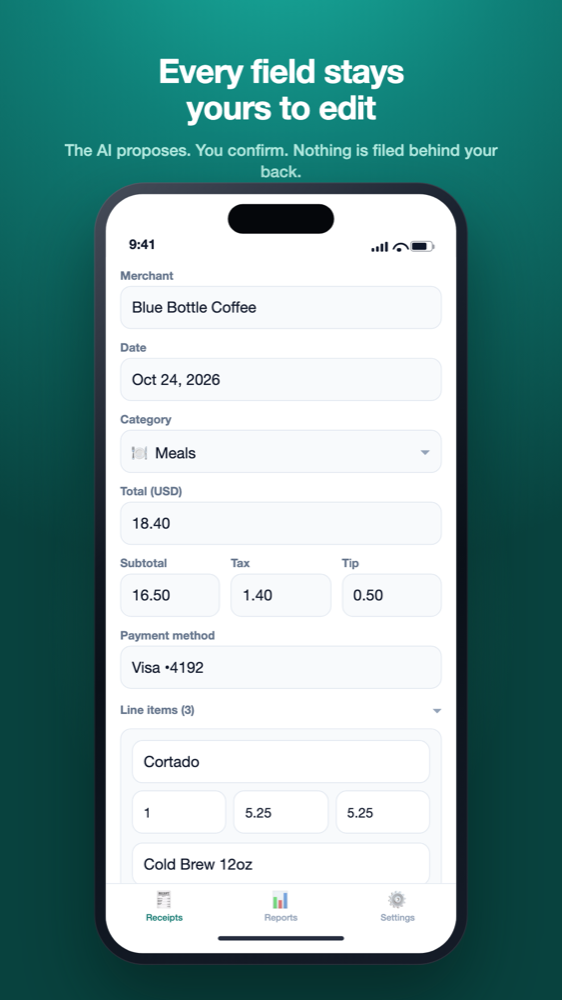
Each successful scan opens on a review form. The category is a picker, so a coffee the AI filed under Meals can move to another category before you confirm, and every other field stays editable too. If the AI wasn’t fully confident, one banner asks you to double-check. Your custom categories appear in the same picker, and you can rename or remove them later; the 15 built-ins can’t be renamed. The AI only suggests built-ins, so choosing a custom category is always your call.
At quarter or year end, Reports shows totals by category with each one’s receipt count and share, for this month, last month, this quarter, year to date or a custom range. Currencies are totaled separately, so readers outside the US can use the app too, under their own tax rules. The CSV export includes a category column your accountant can map to lines, and our weekly receipt system shows where this fits in a routine. InvoScan is launching soon: join the waitlist to hear on launch day.
Before you save a receipt
- Confirm the category, or change it.
- For meals, note who was there and the business reason.
Frequently asked questions
What are the Schedule C expense categories?
They're the Part II lines of Schedule C, lines 8 through 27b plus line 30. The common ones for freelancers include advertising, car and truck, contract labor, legal and professional services, office expense, supplies, travel, deductible meals, utilities, other expenses and business use of your home. See the IRS Schedule C instructions.
Where do software subscriptions go on Schedule C?
There's no dedicated line. The 2025 instructions list business subscriptions under Part V other expenses (line 27b), but most computer software must be capitalized and depreciated or expensed under section 179. Ask your tax professional which applies.
Can I deduct 100% of a business meal?
In most cases, no. The Schedule C instructions say the percentage for business meals is usually 50%, and entertainment isn't deductible on the meals line. Some transportation workers get a higher rate. See IRS Publication 463.
Does the category I pick in an app decide my deduction?
No. App categories organize your records; the line and amount are decided when your return is prepared. InvoScan's category suggestions are starting points, not tax advice. Our receipt system guide covers keeping them tidy all year.
What goes in Other expenses on Schedule C?
Business expenses that don't fit lines 8 through 27a or line 30. You list each by type and amount in Part V (line 48), and the total flows to line 27b.
Not tax advice
This article is general education for US self-employed filers, based on IRS guidance as of September 2026. It is not tax, accounting or legal advice. InvoScan's category suggestions are starting points, not tax advice, and AI-read figures should always be checked. For decisions about your own return, talk to a qualified tax professional such as a CPA or enrolled agent. See our Terms.