How to Organize Receipts for Taxes: A 10-Minute Weekly System
The shoebox fails because filing a receipt takes longer than putting it off. A small system that works with or without an app.

Here’s how to organize receipts for taxes without losing a weekend every April. Capture each receipt the moment you pay. Give it a category and a one-line business purpose the same day. Spend ten minutes a week sweeping up anything you missed, check your statements once a month, and export one clean file at year end. That’s the whole system, and it works with a folder and a spreadsheet or with an app. The one design rule: filing a receipt must take less effort than putting it off.
This guide is for US freelancers who file Schedule C and leans on the IRS’s own record-keeping guidance. It’s general education, not tax advice.
Why the shoebox fails
The shoebox (or the glovebox, or the tote bag) isn’t a character flaw. It fails for a mechanical reason: at the moment you’re handed a receipt, filing it properly takes longer than stuffing it somewhere. So you stuff it. Repeat that for a year of client coffees, printer ink and parking, and you get the April scramble: a pile of curled paper, some of it too faded to read, none of it labeled, and no memory of who that $64 lunch was with.
More discipline won’t fix it; smaller steps will. The IRS doesn’t require a particular method. According to IRS Publication 583, you can use any recordkeeping system suited to your business, as long as it clearly shows your income and expenses. So pick the lightest one you’ll actually keep up.
How to organize receipts for taxes: the system at a glance
Five small habits, each with a clear trigger. The times are rough guides, not promises.
| Habit | When | Roughly | What you end up with |
|---|---|---|---|
| Capture | At the register, or when the email lands | Seconds | A photo or file of every receipt |
| Categorize and note the purpose | The same day | Under a minute each | A category and a one-line note |
| Weekly sweep | Same slot every week | 10 minutes | Nothing left in pockets or inboxes |
| Monthly check | First week of the month | 10–15 minutes | Receipts that match your statements |
| Year-end export | Once, before you file | Under an hour | One file for your accountant |
Step 1: Capture at the register
The best time to record a receipt is the thirty seconds after you pay, while it’s flat, legible and in your hand. Lay it on the table, fill the frame, keep your shadow off it, and take the photo before it goes in your pocket.
Not every receipt is paper, so give each kind one home:
- Paper till receipts: photograph at the counter, or in the car before you drive off.
- Emailed receipts and invoices: move them into one email folder or label, such as “Receipts 2026”, as they arrive. Save a PDF if the link might expire.
- Subscriptions that bill automatically: most services keep an invoices page. Download them at your monthly check.
- No receipt at all (a parking meter, a cash tip): write a quick note the same day with the date, amount, place and purpose. IRS Publication 463 advises recording expenses at or near the time you incur them.

Step 2: Categorize it the same day and note the business purpose
A receipt shows what you paid and where. It doesn’t show why. Publication 583 says your supporting documents should show the amount paid and that it was for a business expense, and it’s blunt about the gap: proof of payment “by itself, does not establish you are entitled to a tax deduction.”
So on the same day, add two things:
- A category. Use buckets that line up with the expense lines in Part II of Schedule C (see the IRS Schedule C instructions), such as supplies, travel, meals and advertising, so your year-end totals map straight onto the form.
- A one-line business purpose. Who, what, why. Write it on the paper, in the file name or in a notes field.
For travel, gifts and car expenses, Table 5-1 of Publication 463 lists what your records should show, including the amount, the time, the place or a description, and the business purpose. The same chapter says you generally need a written statement of the business purpose, and a one-line note is exactly that.
| Receipt | What to jot down | Example note (fictional) |
|---|---|---|
| Client meal | Who, their role, what you discussed | Lunch with J. Park (client), homepage redesign kickoff |
| Business trip | Where, and why you went | Two-day on-site workshop for client, Denver |
| Supplies | What it’s for | Printer ink for client proof prints |
| Software | Which work it supports | Stock photo plan, used for client social posts |
| Parking or rideshare | Where and why | Parking for product shoot at client office |
Gray areas: flag them, don’t guess
Mixed-use purchases such as a laptop you also use at home, a phone plan or a home office have their own rules. Record what it is, note “partly personal”, and leave the decision to your tax professional.
Paper vs digital receipts, and how to name them
Digital receipts for taxes are fine in principle. The IRS says the requirements that apply to paper records also apply to electronic records. Publication 583 adds that an electronic system must be able to index, store, preserve, retrieve and reproduce records in legible form, points to Revenue Procedure 97-22 for the details, and expects the system to be tested before paper originals are destroyed. Ask your tax professional before you shred anything, or keep each month’s paper in one envelope.
In practice, every digital receipt should pass three tests. Can you read it? Are the merchant, date and total visible? Can you find it again in under a minute?
A naming scheme you can search
If you keep files yourself, pick one pattern and stick to it. Put the date first (year, month, day) so files sort in order, then the merchant, then the amount:
Receipts/
  2026/
    2026-03/
      2026-03-14_northside-print_42.18.jpg
      2026-03-15_city-parking_12.00.jpg
      2026-03-18_client-lunch-jpark_64.30.jpg
Now “parking” or “64.30” finds the right file, and each month’s folder doubles as your checklist against a statement.
Step 3: The 10-minute weekly sweep, plus a monthly check
Capture won’t be perfect, and it doesn’t need to be. Book the same slot every week; Friday afternoon works, while the week’s receipts are still in your bag. Publication 463 is realistic here too: a log kept on a weekly basis that accounts for the week counts as a timely-kept record.
Every week (about 10 minutes)
- Empty your pockets, wallet, bag and car. Photograph any stray paper receipts.
- Move new emailed receipts into your receipts folder or label.
- Give every receipt from the week a category and a business-purpose note.
- Retake any blurry or cut-off photo now, while the paper still exists.
- File or recycle the paper according to your own rule.
Every month (10–15 minutes)
- Open your card and bank statements and tick off each business charge against a receipt.
- Chase the gaps. Re-download online invoices; for a lost paper receipt, write a note with the date, amount, place and purpose.
- Download invoices for subscriptions that renew automatically.
- Glance at your category totals. Anything oddly large may be in the wrong bucket.
Statement matching is the step people skip, and it’s the one that finds the missing lunch. Publication 583 says an account statement can help prove payment, but a statement line doesn’t show what you bought. Your receipt and note do.

Step 4: One export at year end for your accountant
If the weekly and monthly habits held, year end is almost dull. You need one file your accountant or tax software can work from.
- Close the year. Run the monthly check for December and chase anything missing.
- Build one spreadsheet. One row per receipt: date, merchant, category, amount (with tax and tip split out if you have them), payment method and note.
- Add a category summary. A pivot table or a short list with the total for each category.
- Keep the images alongside it. The year’s receipt folder, named as above, backs up every row.
- Send it once. One email or shared folder, with a short list of anything you flagged as a gray area.
Our walkthrough on exporting receipts to a CSV your accountant can use covers column layout and opening the file in a spreadsheet. Then keep it. The IRS’s general rule is to keep records that support a return for three years, with longer periods in some situations. See How long should I keep records?
Running the system in InvoScan
InvoScan is the receipt app we’re building for freelancers, so this section is about our own product. It’s launching soon on iPhone, iPad and Android and isn’t in the stores yet. Here’s how each step maps onto it.
- Capture. The camera opens with a dashed frame, the hint “Fit the receipt inside the frame”, a flash toggle and a Retake or Use photo check. Receipt photos you already took can be imported from your photo library.
- Categorize and note the purpose. InvoScan’s server sends the photo to Anthropic’s API, or to OpenAI’s as a backup (neither trains on API data). The AI fills in the merchant, date, subtotal, tax, tip, total, payment method and line items, and suggests one of 15 Schedule C-style categories. Before saving, you check and can edit the merchant, date, category, amounts, payment method and notes; the Notes field holds the business purpose. If the AI isn’t confident overall, a banner asks you to double-check. Faded or crumpled receipts are the usual cause of misreads.
- Weekly sweep and monthly check. The Receipts tab shows one month at a time with its total and receipt count, a merchant search and category filter chips, so matching a card statement is a scroll rather than a dig.
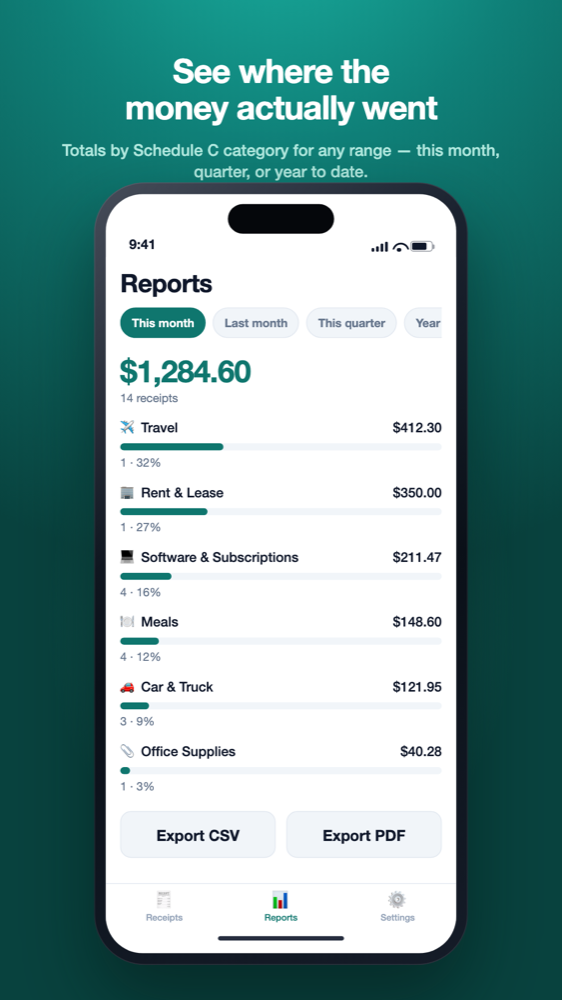
- Year-end export. Reports offers This month, Last month, This quarter, Year to date or a custom range, with totals, counts and each category’s share. Export a CSV (date, merchant, category, subtotal, tax, tip, total, currency, payment_method, notes) or a PDF with a category summary and every receipt. Settings also has “Export all data (CSV)”, a good backup habit.
Some honest limits. InvoScan is a record-keeping tool, not a tax service: category suggestions are starting points and every AI-read figure should be checked. Export is a file, not a live sync with bookkeeping software. The free plan includes 10 AI scans a month, with export and every other feature; Pro raises that to 1,000 scans a month. Currency is read per receipt, so readers outside the US can use it too, under their own tax rules.
If that sounds like your system, join the waitlist for early access. If not, the folder-and-spreadsheet version above works just as well.
Frequently asked questions
How do I keep track of receipts for taxes as a freelancer?
Capture each receipt when you pay, add a category and business purpose the same day, sweep weekly, match statements monthly and export one file at year end. The IRS doesn’t require a particular system, only one that clearly shows your income and expenses (IRS Publication 583).
Does the IRS accept digital copies of receipts?
The IRS says all requirements that apply to paper records also apply to electronic records (IRS: What kind of records should I keep). IRS Publication 583 adds that an electronic storage system must be able to index, store, preserve, retrieve and reproduce records in legible form, and points to Revenue Procedure 97-22 for the details. Ask a tax professional before you destroy paper originals.
How long should I keep receipts for taxes?
Generally three years from when you filed the return they support. It’s longer in some cases: six years if you left out income worth more than 25% of the gross income shown on your return, seven years for a bad-debt or worthless-securities deduction, and indefinitely if you didn’t file or filed a fraudulent return. See How long should I keep records?
Is a bank or credit card statement enough instead of a receipt?
A statement can help show that you paid, but IRS Publication 583 notes that proof of payment by itself doesn’t establish a deduction. Keep the receipt or invoice that shows what you bought, plus a short note of the business purpose.
What should I write on a receipt for a business meal?
According to IRS Publication 463, a restaurant receipt is enough to prove the cost of a business meal if it shows the restaurant’s name and location, the number of people served, and the date and amount. Add a short note of who you were with, their business relationship to you, and the business purpose. How a meal is categorized and how much of it counts are questions for your tax professional; our Schedule C categories guide explains the expense lines.
Not tax advice
This article is general education for US self-employed filers, based on IRS guidance as of September 2026. It is not tax, accounting or legal advice. InvoScan's category suggestions are starting points, not tax advice, and AI-read figures should always be checked. For decisions about your own return, talk to a qualified tax professional such as a CPA or enrolled agent. See our Terms.